合约验证
部署智能合约之后,在区块链浏览器上验证代码是非常重要的。 这可以通过使用开发者工具或 Web UI 以自动化的方式完成。
使用开发者工具
大多数智能合约工具都有插件,可以轻松地在 ConfluxScan 上验证合约。
| 网络名称 | 区块链浏览器 API |
|---|---|
| 主网 | https://evmapi.confluxscan.org/api/ |
| 测试网 | https://evmapi-testnet.confluxscan.org/api/ |
Hardhat
修改 hardhat.config.ts 以指向 Conflux eSpace 的 RPC 和区块浏览器 API。 需要一个虚拟的 apiKey 值,但它的值可以是任何内容。
例如,如果您使用的是 eSpace 测试网,您的配置将如下所示:
...

const config: HardhatUserConfig = {
  ...
  solidity: "0.8.19",
  networks: {
    espaceTestnet: {
      url: "https://evmtestnet.confluxrpc.com",
      accounts:
        process.env.PRIVATE_KEY !== undefined ? [process.env.PRIVATE_KEY] : [],
    },
  },
  sourcify: {
    enabled: false,
  },
  etherscan: {
    apiKey: {
      espaceTestnet: 'espace',
    },
    customChains: [
      {
        network: 'espaceTestnet',
        chainId: 71,
        urls: {
          apiURL: 'https://evmapi-testnet.confluxscan.org/api/',
          browserURL: 'https://evmtestnet.confluxscan.org/',
        },
      },
    ],
  },
}

...
现在您可以通过运行以下命令来验证智能合约。
npx hardhat verify --network espaceTestnet <contract address> <space separated constructor parameters>
例如,这是一个在构造函数中接收两个 uint 参数的智能合约的验证方式:
npx hardhat verify --network espaceTestnet 0xD9880690bd717189cC3Fbe7B9020F27fae7Ac76F 123 456
Note: If the above does not work, try verifying with the following instead: apiURL: 'https://evmapi-testnet.confluxscan.net/api/', and browserURL: 'https://evmtestnet.confluxscan.net/'.
Foundry
在使用 Foundry 时,verify-contract 命令有助于自动化验证合约。 如果您的合约中包含构造函数参数,您可以使用 --constructor-args 选项以 ABI 编码形式指定它们。 例如,如果您的构造函数接受两个 uint256 变量:
--constructor-args $(cast abi-encode "constructor(uint256,uint256)" 0 7)
请参阅Foundry documentation 以获取更多的选项。
forge verify-contract <contract address> <contract name> \
  --verifier-url https://evmapi-testnet.confluxscan.org/api/ \
  --etherscan-api-key <anything is ok> \
  --constructor-args <your constructor arguments>
不要指定链 ID。
在 Web UI 上进行手动验证
在 eSpace 上部署的任何合约都可以在 ConfluxScan 区块浏览器的合约详情页面上进行验证。 如果合约未被验证,合约详情页面将显示一个可以进入验证页面的入口。
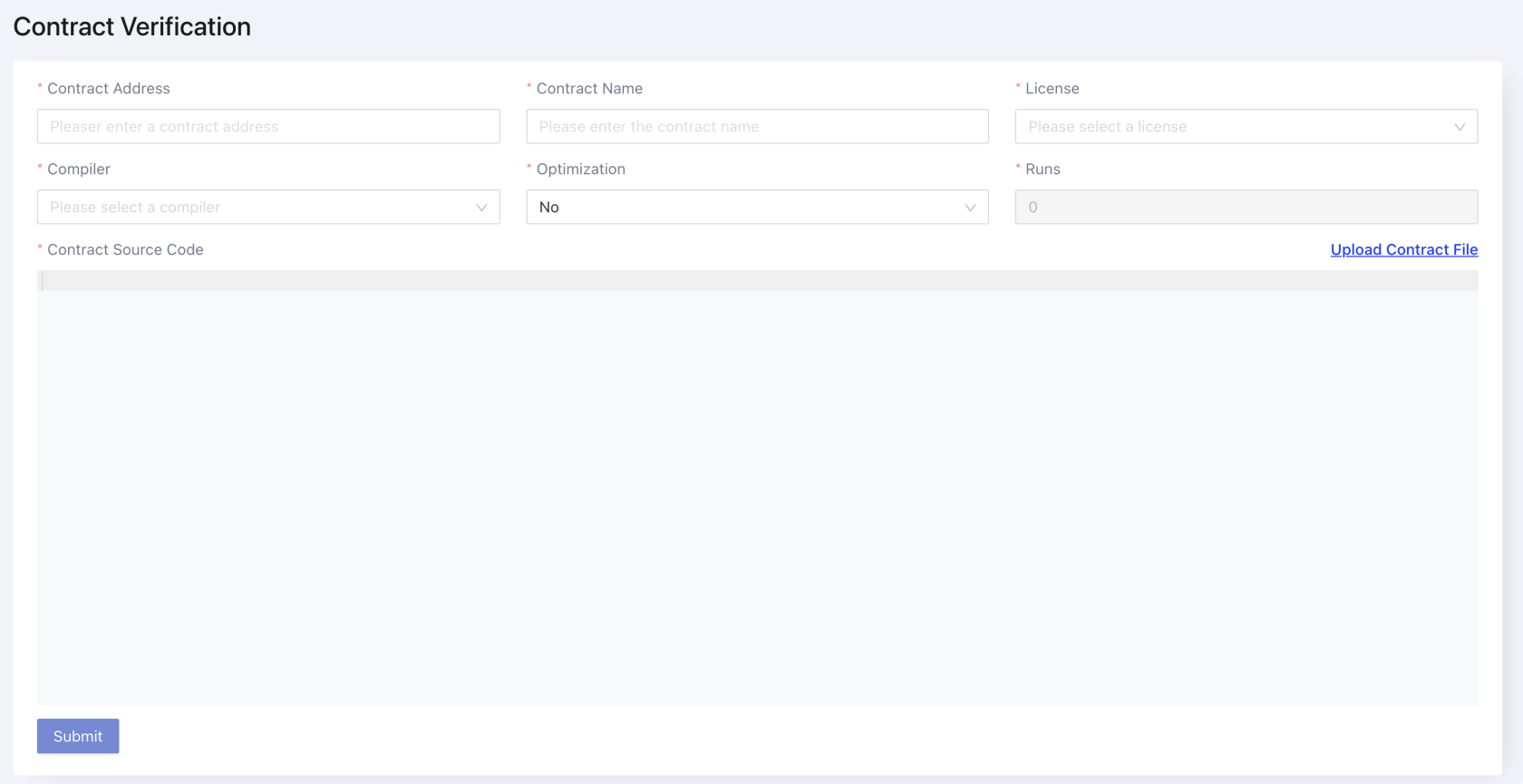
开发者可以使用 flatten 工具(hardhat、foundry)将合约及其依赖合并为一个文件。 然后将合并后的代码复制到编辑器中。 填写合约名称、编译器版本以及许可证。 最后,点击提交按钮验证合约。
如果合约验证失败,可能是编译器版本、优化设置或 EVM 版本设置的不正确。 请检查合约部署配置中的编译器版本和优化设置。